

Downloading an online gaming application is simple, but checking a few important details before installation can make the experience smoother and safer. 9IPL Game Download is intended for users who want mobile access to different gaming categories through one application. The official 9IPL website describes options including Cricket Games, Live Casino, Aviator, Wingo, Rummy, Slots, Lottery, Fishing Games, and other entertainment categories. The platform also highlights a mobile-focused interface, account access, registration, and regular application updates. Before installing any APK, users should verify the source, check device compatibility, review permissions, and understand the platform’s terms. These basic checks can help beginners avoid common installation and account-related problems.
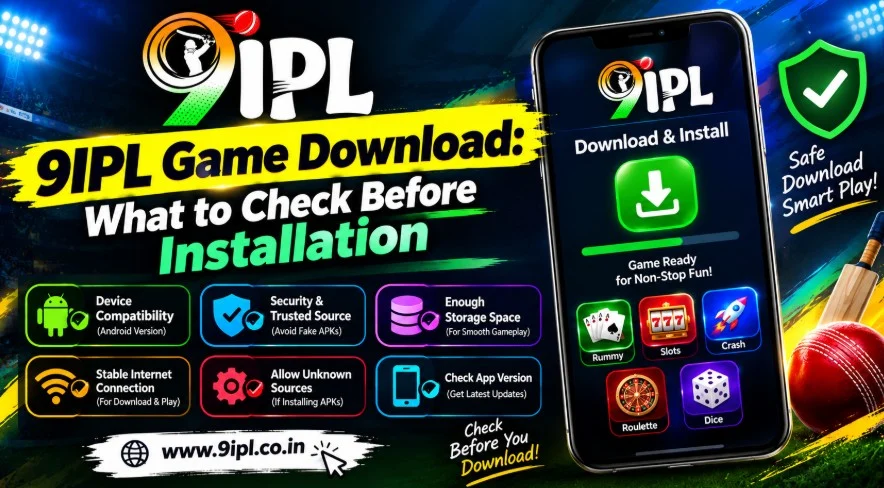
What Is 9IPL Game Download?
The term 9IPL Game Download refers to obtaining the 9IPL mobile application or APK so that users can access the platform from a compatible Android device. According to the official download page, the application is designed specifically for mobile users and provides access to multiple gaming categories through one interface. Instead of opening a browser whenever they want to access their account, users can install the application and use its mobile-oriented interface. However, downloading an APK is different from installing an application through an official app store. Users should therefore pay attention to the source of the installation file and avoid random links or unverified websites.
Before starting the installation process, users can visit the official 9IPL website and review the latest platform information. This is particularly useful because APK versions, features, compatibility, and installation requirements can change over time.
Why Check the Download Source First?
Checking the download source should be one of the first steps before installing any APK. An APK file obtained from an unknown website, random message, or unverified link may create unnecessary security concerns. The 9IPL installation guide specifically recommends obtaining the appropriate APK from a verified source and avoiding files received through random messages or unknown links. Users should therefore confirm that the page they are using is connected to the official platform before downloading an installation file. This simple step can reduce the possibility of installing an altered, incomplete, or outdated file and can also help users protect their personal account information.
The official Download 9IPL Game page provides information about the application and its mobile-focused features. Users should refer to the latest instructions there rather than relying on old APK pages found through unrelated websites.
Check Android Device Compatibility
Device compatibility is another important consideration before starting the 9IPL Game Download process. The official 9IPL application page states that the APK is optimized for Android smartphones and tablets, while compatibility can still depend on the Android version and device specifications. Users should make sure their phone has enough available storage before beginning installation. A partially downloaded or incompatible APK may result in installation errors. Checking the device’s operating system, available storage, and general performance can help users determine whether the application is suitable for their phone. If the application has specific technical requirements, users should follow the latest information provided by the official platform.
Check Available Storage Before Installation
Storage space is easy to overlook when downloading an APK, but insufficient space can interrupt installation or prevent the application from being installed correctly. Before starting the 9IPL Game Download, users can check their Android device’s available storage and remove unnecessary files if additional space is required. It is also useful to make sure the APK has downloaded completely before opening it. An incomplete file can sometimes produce installation errors even when the device itself is compatible. If an installation fails, users should first check available storage, Android compatibility, and the integrity of the downloaded file before trying repeated installations from unrelated sources.
Understand APK Installation Permissions
Android may display a security warning when users attempt to install an APK obtained outside a traditional app store. Users should not automatically approve every permission or security setting simply to complete installation. Instead, they should review where the file came from and understand why a particular installation permission is being requested. The official 9IPL guide recommends reviewing security warnings and checking application permissions carefully. If an application requests access that appears unrelated to its stated purpose, users should consider stopping the installation and verifying the source first. This is an important precaution for protecting personal information and maintaining better control over an Android device.
Review the App Features Before Installing
The 9IPL mobile application is presented as a single platform containing several gaming categories. The official download page lists Cricket Games, Live Casino, Aviator, Wingo, Rummy, Slots, Lottery, Fishing Games, and Table Games. The application also provides features such as account access, registration, mobile navigation, and game-category browsing. Understanding these features before installation can help users know what to expect from the application. It is also useful to remember that individual game availability and platform features can change after updates. Users should therefore rely on the latest information rather than assuming that an older version will have exactly the same interface or game selection.
Check the Latest Version
Using an outdated APK can sometimes create compatibility problems, missing features, or installation errors. The official 9IPL pages explain that regular updates can improve stability, performance, and the overall user experience. Therefore, users beginning a 9IPL Game Download should check whether the version they are downloading is the current compatible release. Installing several different APK versions from unrelated websites is not recommended because it can create unnecessary security and compatibility concerns. If an update is available through the official platform, users should follow the latest installation instructions instead of keeping an old version simply because it previously worked on their device.
Register Before Exploring the Platform
New users may need to create an account after completing the application installation. The registration process described by 9IPL involves selecting the Register option, entering the requested information, verifying details if required, and creating secure account credentials. Users should provide accurate information and keep their login details private. If you are new to the platform, the 9IPL Game Register page can be used to understand the account creation process. Existing users do not necessarily need to create another account and can generally access their existing account through the application’s login section using their registered credentials.
How Login Works After Installation
After a successful 9IPL Game Download and installation, registered users can access their account through the application’s login section. The official platform explains that users can enter their registered login information and access the gaming dashboard. Keeping credentials private is important, especially when the application is being used on a shared device. Users should also avoid entering passwords or account information into unofficial websites claiming to provide technical assistance. If login problems occur, checking the internet connection and registered credentials should be the first steps. For account-related problems, users should use the official support or recovery options rather than relying on unknown individuals.
Users who already have an account can use the 9ipl login page for official login information and account access guidance.
Check Your Internet Connection
A stable internet connection is useful when downloading an APK, completing registration, logging into an account, and accessing online games. A weak connection can interrupt downloads and potentially result in an incomplete installation file. Before beginning the 9IPL Game Download, users should preferably use a stable Wi-Fi or mobile-data connection and wait until the download has completed before opening the file. Once installed, online gaming also depends on network connectivity. If pages are loading slowly or the application cannot connect to the platform, users can check their internet connection before assuming that the application itself is causing the problem.
Understand Real-Money Gaming Before Playing
Because the platform includes real-money gaming categories, users should understand the financial risks before depositing funds or participating. The official 9IPL guide states that games involving money carry a possibility of financial loss and should not be considered a guaranteed way of earning income. Users should review the applicable terms, limits, withdrawal conditions, and rules before participating. They should also check whether real-money gaming services are permitted in their location. Setting a personal spending limit can help users maintain control over their activity, while chasing losses or increasing spending after losing money can create additional financial risk.
Review Account and Payment Information
Before using any real-money gaming feature, users should understand how deposits, withdrawals, and other financial transactions work on the platform. The exact conditions may vary according to the current platform terms and the particular service being used. Users should not share passwords, OTPs, banking details, or other sensitive information with people claiming to provide technical support. The official 9IPL guide specifically advises users not to share such information with unknown individuals. Before making a transaction, users should verify that they are using the official platform and understand any applicable conditions or limits.
Explore 9IPL Games After Installation
Once installation, registration, and login have been completed, users can explore the available gaming categories. The platform lists Cricket Games, Live Casino, Aviator, Wingo, Rummy, Slots, Lottery, Fishing Games, and other options. Beginners may find it easier to start with one category, read its rules, and understand its interface before moving to another. The 9IPL Games page provides information about the different categories available through the platform. Users should remember that game availability and features may change, so the latest information should always be checked before participation.
Mobile-Friendly Experience
The official 9IPL download page emphasizes that the application has been designed for Android devices and provides a mobile-focused experience. Its interface is described as responsive, with organized menus, simple navigation, and access to different gaming categories. For users who prefer smartphones and tablets, installing the application can provide a more direct way to access their account compared with repeatedly opening a browser. However, users should still maintain their device security by keeping Android updated, using strong account credentials, and installing applications only from sources they trust. These practices are useful regardless of whether the application is used casually or regularly.
Keep Your Account Secure
Security should continue to matter after the 9IPL Game Download has been completed. Users should create strong passwords and avoid using the same credentials across multiple unrelated services. Login information should not be shared with friends, strangers, or people claiming to offer technical support. Users should also avoid saving sensitive account information on public or shared devices. If a phone is lost or replaced, account credentials should be updated or secured as appropriate. The official 9IPL pages also encourage players to use official account-access methods. Maintaining basic account security can help reduce the possibility of unauthorized access or unnecessary account-related problems.
Contact Support Through Official Channels
If users experience problems with registration, account access, installation, or other platform-related matters, they should use official support channels instead of relying on unknown social-media accounts or individuals. The official website provides a dedicated contact page for platform-related inquiries. Users can visit Contact us when they need additional information or assistance. Keeping support communication within official channels is particularly important when an issue involves passwords, OTPs, payments, or account credentials. Users should never provide sensitive information to someone simply because that person claims to represent the platform.
9IPL Game Download Checklist
Before starting a 9IPL Game Download, beginners can use a simple checklist to make sure the basic requirements have been considered. First, verify the source of the APK. Second, check Android compatibility and available storage. Third, confirm that the downloaded file is complete. Fourth, review Android’s security warnings and application permissions. Fifth, install the application and complete registration or login through the appropriate official process. Finally, read the relevant game rules and real-money gaming conditions before participating. Following these steps does not guarantee a problem-free experience, but it can help users avoid several common installation and account-management mistakes.
| Check Before Installation | Why It Matters |
| Verify the download source | Helps avoid unknown or altered APK files |
| Check Android compatibility | Reduces compatibility and installation problems |
| Check available storage | Prevents interrupted or failed installations |
| Review permissions | Helps identify unusual access requests |
| Check the APK version | Helps avoid outdated compatibility issues |
| Use strong credentials | Helps protect account access |
| Review platform terms | Helps users understand applicable conditions |
| Check real-money rules | Helps users understand financial risks |
| Keep the app updated | Provides current improvements and fixes |
| Use official support | Reduces risks from unknown third parties |
What to Do If the APK Does Not Install
If the application does not install correctly, users should avoid repeatedly downloading APK files from unrelated websites. Instead, they can first check whether their Android version is compatible, whether enough storage is available, and whether the downloaded file completed successfully. A damaged or incomplete APK may fail even when the device meets the basic requirements. Users should also review any Android security warning before changing installation settings. If the problem continues, obtaining the latest compatible version from a verified source is preferable to experimenting with multiple unknown files.
Responsible Gaming After Installation
Installing the application is only the beginning; responsible use remains important afterward. The official 9IPL download page encourages players to manage their time wisely and stay within their personal limits. Real-money games involve financial risk, so users should never assume that a particular game will guarantee winnings. A predetermined entertainment budget can help users control spending, while taking breaks can prevent gaming sessions from becoming unnecessarily long. Users should also avoid attempting to recover losses by increasing their stakes. Understanding the rules and accepting the possibility of losing money before participating is an important part of responsible real-money gaming.
Final Thoughts on 9IPL Game Download
A successful 9IPL Game Download involves more than simply obtaining an APK file and pressing the installation button. Users should first verify the download source, check Android compatibility, confirm available storage, review permissions, and make sure they are using the latest compatible version. After installation, account credentials should remain private, and users should understand the rules and conditions of any real-money gaming activity before participating. The official 9IPL platform provides access to several categories, including Cricket Games, Live Casino, Aviator, Wingo, Rummy, Slots, Lottery, and Fishing Games. Users should rely on current official information for downloads, account access, updates, and support.
9IPL Game Download FAQ
What should I check before downloading the 9IPL Game App?
Verify the download source, Android compatibility, storage space, permissions, and latest available application version.
Is the 9IPL Game App designed for Android devices?
Yes, the official download page states that the application is optimized for Android smartphones and tablets.
Where should I download the 9IPL Game App?
Users should obtain the APK through a verified source and avoid unknown websites or random download links.
Can existing 9IPL users access their accounts?
Yes, existing users can generally log in using their registered account credentials.
What games are available through the 9IPL Game App?
The application provides Cricket Games, Live Casino, Aviator, Wingo, Rummy, Slots, Lottery, and Fishing Games.
What happens if my APK installation fails?
Check storage, Android compatibility, file completeness, and obtain the latest version from a verified source.
Should I check APK permissions before installation?
Yes, reviewing permissions can help users identify access requests that appear unrelated to the application.
Is the 9IPL Game App regularly updated?
The official page states that regular updates improve stability, performance, and overall user experience.
Can new users register through the 9IPL Game App?
Yes, the official page states that new users can complete registration through the application.
Can I use real money on 9IPL Games?
Some gaming activities can involve financial transactions, so users should review applicable terms and conditions first.
Does 9IPL guarantee winnings from real-money games?
No, users should understand that real-money gaming carries financial risk and winnings are not guaranteed.
How can I keep my 9IPL account secure?
Use strong passwords, keep credentials private, and access the platform through official channels.
Can I install the APK from random websites?
It is safer to avoid random websites, unknown links, and unverified APK sources.
What should I do before playing real-money games?
Review game rules, financial conditions, applicable limits, and regulations relevant to your location.
How can I contact the 9IPL platform?
Users can visit the official Contact Us page for platform-related support and information.
See More
- 9IPL Game APK: Download, Installation, Features & User Guide
- 9IPL Game: Features, Gameplay and Complete User Guide
- How Does the 9IPL Game App Work? Complete User Guide
- How to Find and Explore Games on the 9IPL App
- How to Update the 9IPL Game App to the Latest Version
- 9IPL Login Guide: How to Access Your Game Account
- 9IPL Game Account Guide: Login, Registration and Access
- How to Browse and Discover Games on the 9IPL App
- 9IPL Game FAQ: Common Questions Answered
- 9IPL Game Registration: How to Create a New Account